
Mouse accelerationWindows pointer consistency
NEXOVORA V10.5 • Windows 10 & 11
Smoother frames.
Sharper input.
Full control.
Detect the active game, reduce avoidable background load, apply backed-up Registry & Input settings and measure the result on your own hardware.
LiveFPS & frame-time overlay
Backed upRegistry and input rollback
MeasuredNo invented performance result
Performance gains vary by game and PC. Large gains are possible on severely misconfigured systems, but no fixed FPS increase is promised.
VERIFIED BENCHMARKSession readyInteractive demo below
SAFETY STATUSRollback armedThermals monitored
GAME DETECTEDVALORANT profile ready
COMPATIBLE WITHWINDOWS 10WINDOWS 11NVIDIAAMDINTELRAZERLOGITECHCORSAIR
Interactive application preview
Explore NEXOVORA
before you buy.
Click a module to see the tools, information and safety controls available inside the Windows application.
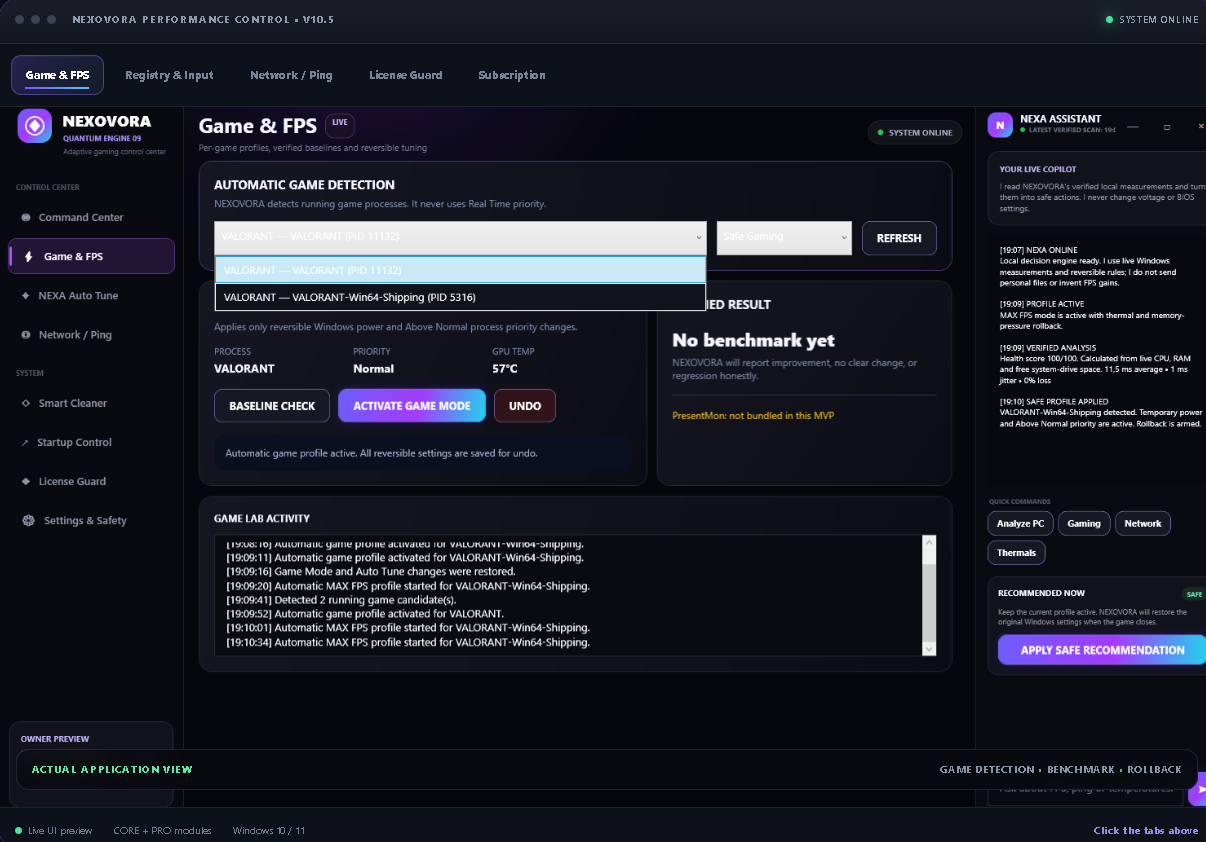
LIVE APP SCREENSHOTGAME DETECTION • BENCHMARK • ROLLBACK
REGISTRY & INPUT
BACKUP READYVisible commands. Reversible values.
Keyboard responseFast repeat • shortest delay
Windows Game ModeGaming profile enabled
Game DVR captureBackground recording disabled
C:\NEXOVORA>
backup registry values
preview selected commands
open CMD and apply automatically
NETWORK LAB
LIVEMeasure stability before changing anything.
LIVE LATENCY SAMPLE
LEMON SQUEEZY LICENSING
ACTIVEYour plan. Your device. Your control.
◇
LICENCE PLANNEXOVORA PROVerified online • device slot active
PROSUBSCRIPTION TIME REMAINING
SYNCEDKnow exactly where your access stands.
00DAYS
:00HOURS
:00MINUTES
:00SECONDS
MONTHLY ACCESSLIVE
Verified with Lemon Squeezy while NEXOVORA is openAutomatic refreshThe timer updates every second and refreshes online.
01AdaptiveProfiles respond to detected hardware and game state.
02ReversibleOriginal Windows values are saved before supported changes.
03VerifiableCompare the same game scene before and after tuning.
04ProtectedAutomatic email key and controlled PC activation.
A complete performance workspace
Every tool has a purpose.
Every result stays visible.
Use a guided profile or take direct control of the modules that matter to your setup. Every supported change stays visible and reversible.
Adaptive FPS Engine
Game detection, priority and power tuning, with automatic restoration when the game closes.
CORE + PROVerified Benchmark
Capture average FPS, 1% lows and frame-time before and after tuning using a repeatable test flow.
PROOverlay Studio
Choose the live metrics, size, opacity and placement for your in-game performance overlay.
CORE + PRONetwork Lab
Measure ping, jitter, packet loss and DNS stability with one-click restoration.
CORE + PROVisual & Power
Apply clean Windows visual presets and temporary gaming power plans without losing the original values.
CORE + PRORegistry & Input
Preview and apply selected mouse, keyboard, Game Mode and Game DVR settings through a visible CMD window, with automatic backup.
CORE + PROSubscription Clock
See the remaining subscription time directly inside the dashboard and License Guard.
CORE + PROLicense Guard
Activate with the purchase email and Lemon Squeezy key, then disconnect safely before changing computers.
CORE + PRONEXA Assistant
A multilingual performance assistant that explains measurements, risks, profiles and the next recommended action.
ADVANCED IN PRONew in V10.5
Registry changes you can see, control and undo.
Select only the settings you want. NEXOVORA shows the commands first, saves the original Windows values and opens CMD to apply them automatically.
- Mouse acceleration consistency settings
- Keyboard repeat speed and delay
- Windows Game Mode and Game DVR controls
- One-click restoration of the saved values
These options may reduce avoidable Windows overhead or improve input consistency. Results depend on the PC and game; no FPS increase is guaranteed.
REGISTRY & INPUTBACKUP READY
Mouse accelerationWindows pointer consistency
Keyboard responseFast repeat • shortest delay
Windows Game ModeGaming profile enabled
Game DVR captureBackground recording disabled
C:\NEXOVORA> preview → backup → open CMD → apply
SHOW COMMANDSOPEN CMD & APPLY
Designed around proof
From scan to verified result.
A simple four-step flow keeps optimisation understandable and reversible.
Detect
Identify the active game, hardware pressure and current Windows state.
Measure
Capture a baseline for FPS, 1% lows, frame-time and network quality.
Tune
Apply the selected reversible profile and monitor temperature and stability.
Verify
Keep the change only when the measured result supports it, otherwise restore.
Measured on your hardware
See the difference.
Keep only what works.
NEXOVORA records the same performance metrics before and after a profile. The app reports improvement, no clear change or regression instead of inventing a universal FPS claim.
FPSAverage frames1% LOWStutter visibilityFRAME TIMEConsistencyPINGNetwork quality
VERIFIED BENCHMARK SESSIONINTERACTIVE WEBSITE PREVIEW
Average FPS--
1% low--
Frame time--
Ping--
Captured in the selected game scene.
→
Average FPS--
1% low--
Frame time--
Ping--
Run the baseline first, then verify the result.
Benchmark flowWaiting for baseline
No fabricated benchmark numbers — click Run baseline to begin.ROLLBACK READY
Control without blind risk
Performance with a recovery plan.
NEXOVORA records supported original values before tuning, monitors the session and keeps rollback within reach.
- Automatic rollback after thermal or stability regression
- Never uses Real Time process priority
- Original Windows values saved before modification
- Honest result: improvement, no clear change or regression
LIVE SAFETY SCAN100 / 100
GPU temperature62°C
CPU load71%
Memory pressure44%
Rollback armedOriginal settings protected
Choose your access
Choose the plan
that fits your setup.
Core covers essential optimisation. Pro unlocks the complete benchmark, overlay and advanced control suite.
FLEXIBLE ACCESSMONTHLY PLANS
COREESSENTIAL
MONTHLY ACCESS
Clean, safe optimisation for players who want a faster setup without complexity.
€9.99/ month
Cancel anytime. One active PC.
- Safe automatic Game Mode
- Registry & Input controls
- Live FPS, CPU, GPU and RAM overlay
- Visual and power presets
- Network and DNS diagnostics
- Backups and rollback
RECOMMENDED
PROCOMPLETE SUITE
MONTHLY ACCESS
Full measurement, customisation and performance controls for serious players.
€19.99/ month
Cancel anytime. One active PC.
- Everything in Core
- Max Mode and advanced profiles
- Before/after FPS verification
- Full custom Overlay Studio
- 1% low and frame-time analysis
- Clock Lab integration
- Advanced NEXA analysis
ONE-TIME PAYMENTLIFETIME PLANS
∞
CORE LIFETIMEPAY ONCE
PERMANENT ACCESS
All essential CORE optimisation tools with a single payment and no monthly renewal.
€49.99one time
No recurring billing. One active PC.
- Everything in Core Monthly
- One-time payment
- No monthly renewal
- Automatic licence key delivery
- Protected device activation
- Backups and rollback
BEST VALUE
∞
PRO LIFETIMEFULL SUITE
PERMANENT ACCESS
The complete NEXOVORA suite with one payment, advanced modules and no recurring bill.
€89.99one time
No recurring billing. One active PC.
- Everything in Pro Monthly
- Max Mode and advanced profiles
- Before/after FPS verification
- Full Overlay Studio
- Advanced NEXA analysis
- One-time payment, no renewal
🔒 Secure checkout✉ Automatic key delivery↩ Device disconnect support✓ Measured results
Lifetime checkout is not linked yet. Use Discord support or send the two Lemon Squeezy lifetime links to activate these buttons.
Results depend on the game, hardware, drivers, cooling and current configuration. NEXOVORA can improve performance when removable bottlenecks are present, but it does not guarantee a specific FPS or ping increase.
Automatic activation
Protected account. No device code to send.
Register, complete checkout, receive your key and activate the current PC directly inside NEXOVORA.
Register or log inYour account protects the customer download and purchase access.
Checkout and receive your keyChoose Core or Pro. The unique key arrives in the Lemon Squeezy receipt.
Activate this PCEnter the purchase email and key. NEXOVORA verifies the plan automatically.
Buyer feedback
Real reviews only.
No invented ratings.
NEXOVORA will publish feedback only after verifying a real purchase. Until verified reviews are available, the site will not display fake names, ratings or download totals.
Purchase verified
Reviews can be linked to a completed Core or Pro order.
Results stay specific
Hardware, game and test conditions can be included with performance feedback.
Negative feedback stays useful
No-clear-change and regression reports help improve future profiles.
VERIFIED BUYER REVIEWSReview feed ready for genuine customer feedback.
Join the communityQuestions
Clear answers before you buy.
How much FPS can NEXOVORA add?
There is no universal number. A badly configured or heavily bottlenecked PC may gain substantially, while an already optimised or GPU-limited system may show little change. NEXOVORA measures the result on the buyer's own PC instead of promising a fixed gain.
How does activation work?
After checkout, Lemon Squeezy sends a unique licence key by email. Open NEXOVORA, enter the same purchase email and key, then select Activate This PC. Core or Pro is detected automatically.
Can I move my licence to another PC?
The licence has a limited device activation count. Use Disconnect / Change Key in the application before moving it, or contact support if the old PC is unavailable.
Are Registry & Input changes reversible?
Yes. NEXOVORA saves the original supported registry values before applying selected changes. Use Restore Backup to return to those saved values.
Is my payment information stored on this website?
No. Checkout, payment and licence delivery are handled by Lemon Squeezy.
Does NEXOVORA change BIOS voltages automatically?
No. Raw BIOS and universal voltage changes are not silently applied. Hardware-specific advanced tools must remain explicit and reversible.